
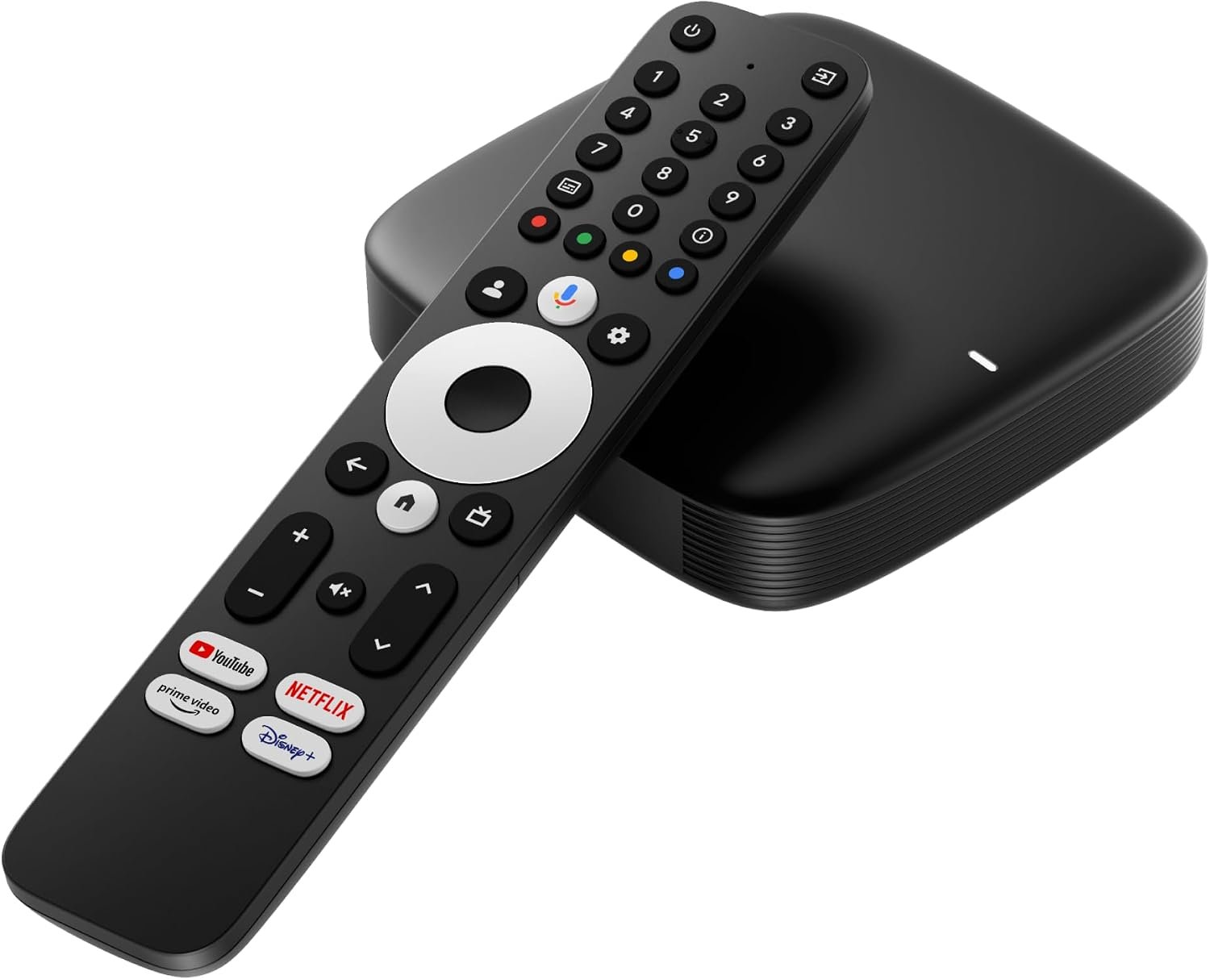
Infomir MAG555 4K Streaming Media Player Google TV™ GTV14, HDR, Wi-Fi, HDMI/AV
$74.95
Related Products
![Smart Projector 4K [VIDAA Live TV & 36W Dolby & Voice Control] with WiFi6 and Bluetooth, Short Throw Projector Compatible with Netflix, AI Auto Focus, HDR10, Home Theater Proyector for Outdoor Movies](https://toptech-finds.com/wp-content/uploads/2026/07/816Shs0uwRL._AC_SL1500_.jpg)


Product description


How do I connect the MAG555 to my TV?
Use the included HDMI cable for modern TVs or an optional AV cable for older sets. Plug the power adapter in, select the matching HDMI/AV input on your TV, and the start-up wizard will appear.
How do I pair the remote control?
Hold Home + Back on the remote for about 10 seconds until the LED blinks; that starts Bluetooth pairing. The remote also works over IR, so basic TV-control keys respond even before pairing.
How do I connect the player to the internet?
During the first launch, the wizard prompts you to choose Ethernet or Wi-Fi—pick your network, enter the password, and wait for the confirmation tick. You can change this anytime under Settings › Network & Internet.
I cannot sign in with my Google Account on first start. What should I do?
Make sure the box is online, then select “Use your phone or computer” to sign in at g.co/androidtv. If the sign-in loop persists, reboot the player, check the date/time, and try again with the on-screen keyboard. (Most issues resolve after a second attempt on a stable network.)
How do I add or switch Google Accounts later?
Go to Settings › Accounts & Sign-In › Add account. Follow the on-screen steps or use the phone-based code method; you can keep multiple profiles and remove them at any time.
How do I use Google Assistant?
Press the (Assistant) button on the voice remote, speak your request, and release. You can launch apps, search shows, or control smart-home devices hands-free.
Can I integrate MAG555 with Google Home?
Yes. In the Google Home app tap + › Set up device › New device, choose your home, and the box will appear if it is on the same Wi-Fi. After linking, you can cast media and include the player in voice routines.
How do I cast videos from my phone?
Ensure phone and MAG555 share the same network, tap the Chromecast icon in a supported app, and select the device name. The stream hands off to the box so your phone can be used normally.
How do I install streaming apps?
Open Google Play Store on the home screen, search the app (e.g., Hulu, Plex), and select Install. Over 10,000 titles are available for Google TV
devices.
Where is Netflix and Disney+?
Both apps are pre-loaded; if you removed them, reinstall from Google Play. Use the dedicated buttons on the remote for one-click launch.
How do I pair Bluetooth headphones or a gamepad?
Navigate to Settings › Remote & Accessories › Pair accessory, choose your device when it appears, and confirm. Bluetooth 5.0 ensures low-latency audio.
What should I do if there is no picture or “No Signal” on the screen?
Verify the HDMI cable is firmly seated, select the correct TV input, and check that the LED on the box is lit. If the TV still shows no signal, try another HDMI port or cable and power-cycle the player.
How can I reset the player to factory settings?
Go to Settings › System › About › Factory reset and follow the prompts. All apps and accounts will be erased, returning the unit to first-boot state.
Does the MAG555 support external storage?
Yes. Plug a USB flash drive or hard disk into either USB 2.0 port to play media files or expand app storage (Format as Device Storage option).
What video quality can I expect?
MAG555 plays 4K HDR content at up to 60 fps and supports AV1, VP9, and HEVC codecs for efficient streaming.

Specification
Video modes 4Kx2K, 1080i/p, 720p, 576i/p, 480i/p Audio codecs AAC-LC & AAC-HE, MPEG-1 Layers 2, 3, Dolby Digital Video containers *.mkv, *.mpg, *.mpeg, *.dat, *.mov,*.mp3, *.ogg Chipset Amlogic S905Y4-B (with Dolby Audio) Processor ARM Quad 64-bit Cortex-A35 RAM DDR4 2GB Flash memory eMMC 16GB Operating system Google TV Digital ports HDMI 2.1 with HDCP Ethernet RJ45 Interface 10M/100M adaptive USB 2 x USB 2.0 Bluetooth 5.0 or higher Wi-Fi 2 x 2 MIMO Wi-Fi 2.4GHz/5GHz 802.11a/b/g/n/ac Power adapter DC 12V, 1A W/D/H 106 x 106 x 23.5 mm
Powerful 4K UHD Streaming Experience: The MAG555 delivers smooth, high-quality video playback in stunning 4K Ultra HD resolution at 60 fps. Powered by an advanced Amlogic chipset with Dolby Audio support, it provides an immersive home entertainment experience for movies and shows. Enjoy vibrant colors and breathtaking clarity through official, licensed streaming services.
Official Google TV Hub with Personalized Access: Transform your television into a sophisticated smart entertainment center powered by official Google TV 12. Access a vast library of authorized streaming services, including Netflix, Amazon Prime Video, Disney+, and YouTube, directly through the Google Play Store. Enjoy seamless content discovery with personalized recommendations based on your viewing habits within a secure and licensed ecosystem.
Advanced Voice Control with Google Assistant: Effortlessly manage your entertainment and search for content using the built-in microphone on the voice remote. Powered by the Amlogic S905Y4-B chipset for rapid response, you can adjust system settings, find authorized apps, and control compatible smart home devices with simple voice commands. Experience hands-free convenience that integrates seamlessly with your official Google TV ecosystem.
Stable Dual-Band Connectivity for 4K Streaming: Equipped with high-speed dual-band Wi-Fi (2.4GHz/5GHz) with 2×2 MIMO technology and a dedicated Ethernet port, the MAG555 ensures a stable, lag-free connection for high-bitrate 4K streaming. Featuring HDMI 2.1 with HDCP support and dual USB 2.0 ports, it provides reliable integration with modern home theater systems and external media storage.
Compact Design & Powerful Performance: This sleek, lightweight TV box (106x106x23.5 mm) blends seamlessly with any entertainment setup. Powered by the Amlogic S905Y4-B chipset and running on official Google TV 12, it provides high-performance 4K streaming capabilities without cluttering your space. It is the ideal solution for upgrading any television with certified smart features and 4K resolution support.
Enhanced Smart TV Features & Official Google Integration: Connect the MAG555 to any TV via HDMI to access a premium Google TV 12 experience. Enjoy seamless media casting with Chromecast built-in and explore a personalized interface tailored to your preferences. Access thousands of licensed applications, movies, and shows directly from the Google Play Store for a high-quality, secure home entertainment setup.
13 reviews for Infomir MAG555 4K Streaming Media Player Google TV™ GTV14, HDR, Wi-Fi, HDMI/AV
Add a review
$74.95
kith007 –
Nick –
Amazon Customer –
PKS007. –
Tader –
Kohulan Panchalingam –
Camerabug –
Maria –
Matthew Simon –
Lisab –
MDem –
Iceberg –
Ravi –